
Research Parameters

Fine-tune Caesar’s research process for optimal results

Caesar’s research API provides several parameters to control the depth, speed, and nature of your research queries. Understanding these parameters helps you balance thoroughness, response time, and cost.

New to Caesar? Start with auto: true to let the system intelligently configure parameters based on your query.

Parameter overview

ParameterTypeDefaultDescription
collection_idsarray-Collection IDs to search across
reasoning_loopsinteger1Maximum reasoning iterations (1-10)
source_timeoutinteger60Seconds to wait per source (3-180)
reasoning_modebooleanfalseUse advanced reasoning models
allow_early_exitbooleanfalseAllow completion before max loops
exclude_socialbooleanfalseExclude social media sources
autobooleanfalseAuto-configure based on query

collection_ids

Specifies one or more file collections to include in the research. When provided, the research pipeline will search across all files within the specified collections, enabling RAG-style queries over your uploaded documents.

1{
2 "query": "Summarize the key findings from my research papers",
3 "collection_ids": ["a1b2c3d4-5678-90ab-cdef-1234567890ab"]
4}

When to use collections

With collections

Use when:

  • You have organized documents into thematic collections
  • You want to research across multiple related files
  • You need answers grounded in your uploaded content

Example: Research across all quarterly reports in your “Financial Reports” collection

With individual files

Use when:

  • You want to analyze specific documents
  • You have a small number of files to include
  • Files aren’t organized into collections

Example: Analyze a single contract or research paper

You can combine collection_ids with files to include both collection-based and individual file sources in a single research request.


reasoning_loops

Controls the maximum number of iterative reasoning cycles Caesar performs. Each loop involves gathering information, analyzing findings, identifying gaps, and refining the response.

1{
2 "query": "What are the implications of quantum computing for cryptography?",
3 "reasoning_loops": 3
4}

How it works

During each reasoning loop, Caesar:

1

Generates search queries

Creates targeted queries based on the research question and current knowledge gaps.

2

Gathers information

Retrieves and processes content from diverse sources.

3

Evaluates completeness

Assesses whether sufficient information has been gathered or if more research is needed.

4

Synthesizes findings

Integrates new information into a coherent understanding.

Choosing the right value

LoopsBest forExample queries
1-2Simple factual queries”What is the capital of France?”, “Apple stock price today”
3-4Comparative analysis”Compare React vs Vue for enterprise apps”
5-6Literature reviews”Recent advances in CRISPR gene editing”
7-10Complex research”Systematic analysis of climate policy effectiveness”

The response includes reasoning_loops_consumed showing how many loops were actually executed. With allow_early_exit: true, this may be less than the maximum.

Performance impact
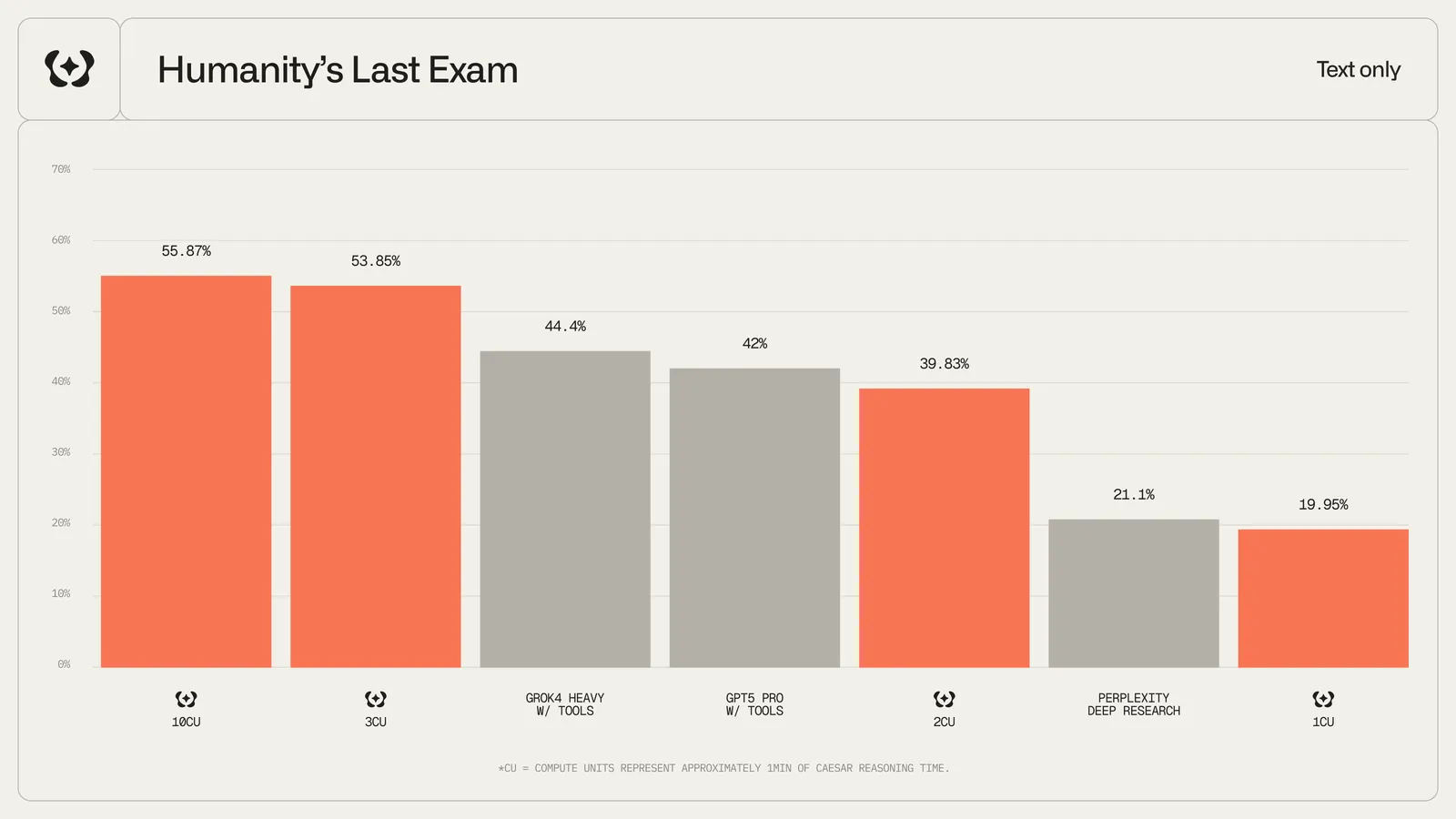
Caesar performance on Humanity's Last Exam benchmark across reasoning loops

Performance on Humanity’s Last Exam (HLE) shows significant improvement from 1 to 3 loops (19.95% → 53.85%), with diminishing returns beyond 5 loops. The sweet spot for most queries is 2-4 loops.


source_timeout

Controls how long Caesar waits when fetching content from each source URL before moving on.

1{
2 "query": "Analysis of recent SEC filings",
3 "source_timeout": 90
4}

When to adjust

Lower timeout (3-30s)

Use when:

  • Speed is critical
  • Sources are generally fast
  • You prefer partial results quickly

Trade-off: May miss slow-loading sources

Higher timeout (90-180s)

Use when:

  • Completeness matters more than speed
  • Researching slow institutional sources
  • Academic or government databases

Trade-off: Longer response times

Very low timeouts (under 10s) may result in incomplete source processing. The default of 60 seconds works well for most use cases.


reasoning_mode

Enables advanced reasoning models for deeper analysis and synthesis.

1{
2 "query": "Evaluate the economic implications of universal basic income",
3 "reasoning_mode": true
4}

Standard vs Advanced mode

  • Uses optimized, faster models
  • Lower latency responses
  • Cost-efficient for straightforward queries
  • Best for: factual lookups, simple summaries, news aggregation

When to enable

Query typeRecommended
News summariesfalse
Market data lookupsfalse
Technical comparisonstrue
Strategic analysistrue
Research synthesistrue
Complex reasoning chainstrue

allow_early_exit

Permits the research process to complete before exhausting all reasoning loops if sufficient information has been gathered.

1{
2 "query": "What is the current Bitcoin price?",
3 "reasoning_loops": 5,
4 "allow_early_exit": true
5}

How it works

When enabled, Caesar evaluates after each loop whether:

  • The query has been sufficiently answered
  • Additional research would be redundant
  • All major perspectives have been considered

If these conditions are met, the process completes early, saving time and resources.

With allow_early_exit: true, a simple query set to 5 loops might complete in just 1-2 loops. Check reasoning_loops_consumed in the response to see actual usage.

Comparison

SettingBehaviorBest for
falseAlways runs all loopsExhaustive research, maximum thoroughness
trueExits when sufficientGeneral queries, cost optimization

exclude_social

Excludes social media platforms (Twitter/X, YouTube) from search results.

1{
2 "query": "Clinical trial results for new Alzheimer's treatment",
3 "exclude_social": true
4}

When to use

Include social (false)

Best for:

  • Sentiment analysis
  • Trend identification
  • Public opinion research
  • Breaking news
  • Community discussions
Exclude social (true)

Best for:

  • Academic research
  • Technical documentation
  • Medical/scientific queries
  • Financial analysis
  • Legal research

auto

Enables intelligent auto-configuration where Caesar analyzes your query and automatically determines optimal parameter values.

1{
2 "query": "Compare the environmental impact of electric vehicles vs hydrogen fuel cells",
3 "auto": true
4}

How auto mode works

When auto: true, Caesar:

  1. Analyzes the query - Evaluates complexity, domain, and intent
  2. Classifies requirements - Determines if the query needs deep reasoning, social sources, etc.
  3. Sets optimal parameters - Configures all other parameters automatically

When auto: true, explicit parameter values you provide are overridden by the auto-detected optimal settings.

Auto mode defaults

If query classification succeeds, parameters are set based on analysis. If classification fails, sensible defaults are used:

ParameterAuto fallback
reasoning_loops2
source_timeout30
reasoning_modetrue
allow_early_exittrue
exclude_socialfalse

Example configurations

Fast response for simple queries:

1{
2 "query": "What is the current market cap of Apple?",
3 "reasoning_loops": 1,
4 "source_timeout": 30,
5 "reasoning_mode": false,
6 "allow_early_exit": true
7}

Response fields

The research response includes fields that reflect parameter usage:

1{
2 "id": "abc-123",
3 "status": "completed",
4 "reasoning_loops_consumed": 2,
5 "running_time": 45,
6 "content": "...",
7 "results": [...]
8}
FieldDescription
reasoning_loops_consumedActual number of loops executed (may be less than max with early exit)
running_timeTotal execution time in seconds

Billing is based on reasoning_loops_consumed, not the reasoning_loops you request. This means you only pay for actual work performed. If early exit completes a job in fewer loops, you’re charged accordingly.


Best practices

Start with auto

Use auto: true for your first queries. Review the results and fine-tune parameters only if needed.

Match complexity

Simple queries don’t need high loop counts. Save resources by matching parameters to query complexity.

Consider your sources

Enable exclude_social for academic or technical research where authoritative sources matter.

Balance speed and depth

Use allow_early_exit: true with higher loop counts to get thoroughness when needed without wasting time on simple queries.

Cost consideration: Higher reasoning_loops and reasoning_mode: true consume more resources. Monitor your usage and optimize parameters for your specific needs.